

Your phone and computer finally understand each other
Digital Transfer sends files, photos and text directly between an Android phone and a computer on the same home network. Nothing to upload to the internet, no cable to find.
-
Paired in seconds
With a QR code, a photo of the QR code, or without a camera using the computer address and an 8-digit code.
-
Both directions
Phone to computer and computer to phone. Several files at once, whole folders on the computer.
-
Large files too
Sent in chunks, encrypted and checksummed. An interrupted transfer resumes where it stopped.
-
Share → Digital Transfer
Send from the gallery and other apps. A Send to PC widget is available on the home screen.
-
Send to phone from File Explorer
An optional Send to → Phone entry in Windows. On the computer you can also just drag files onto the app window.
-
Automatic photo backup
New photos (and optionally videos) go to the computer by themselves when the phone is on your home Wi-Fi. No duplicates, sorted by year and month, original dates kept. Nothing is deleted from the phone.
-
Text and links
Send a link or a note and copy or open it on the other side.
-
Helps when it does not connect
Detects that the phone and the computer are on different networks and shows what to do.
-
Privacy
Data travels only over your local network, directly between your devices, encrypted (AES-256-GCM, SPAKE2 pairing). No server, no account.
-
Czech and English
Czech or English, light and dark theme. Works on Windows, Linux and Android 8.0+. You can report a problem right from the app.
-
History and data wipe
A transfer history with a retention period you choose. The Delete all data option removes pairings, keys, history and settings – received files stay.
-
Free, no account
No ads, no sign-up, no subscription. Your files never wait on another server.
What it looks like
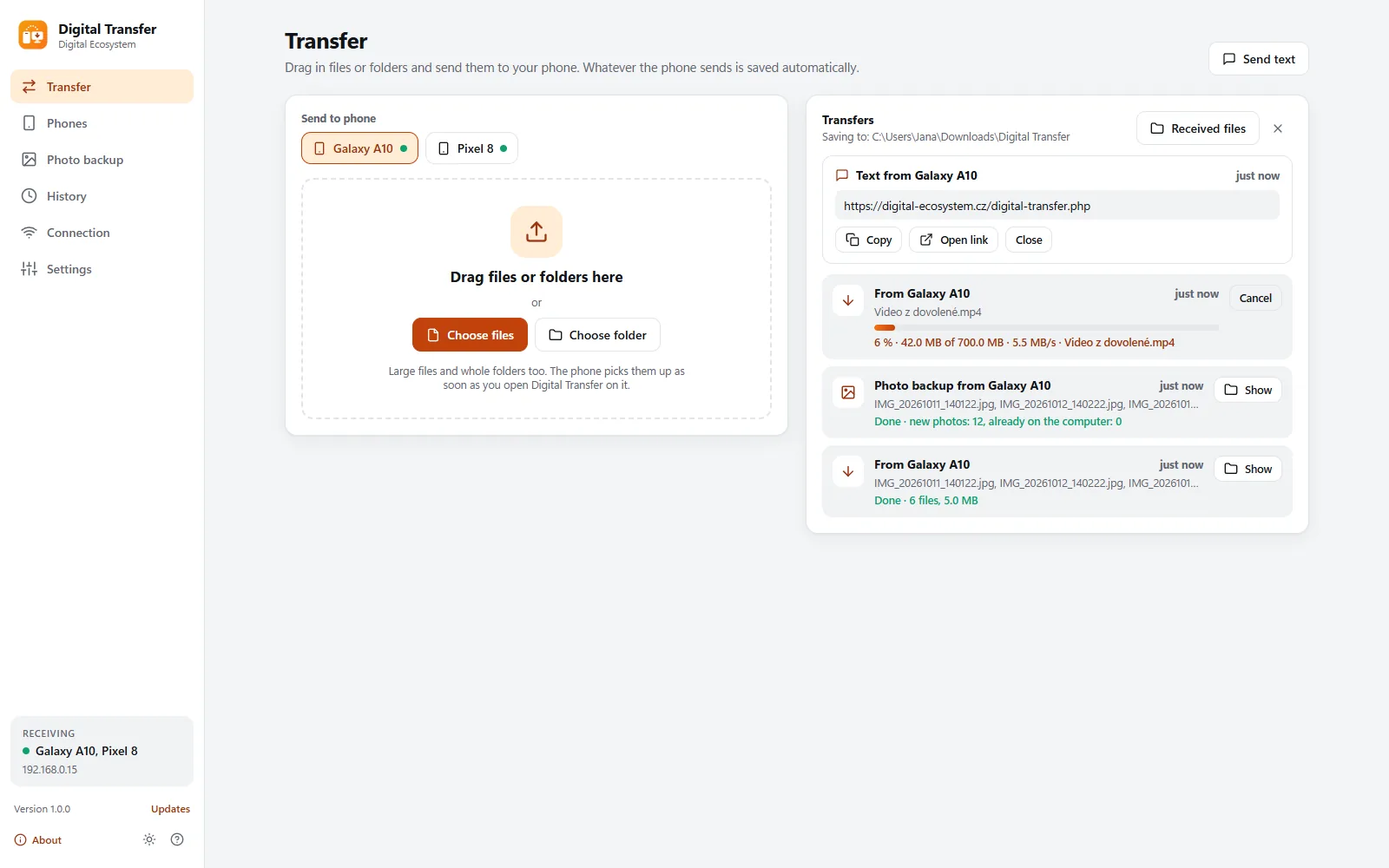
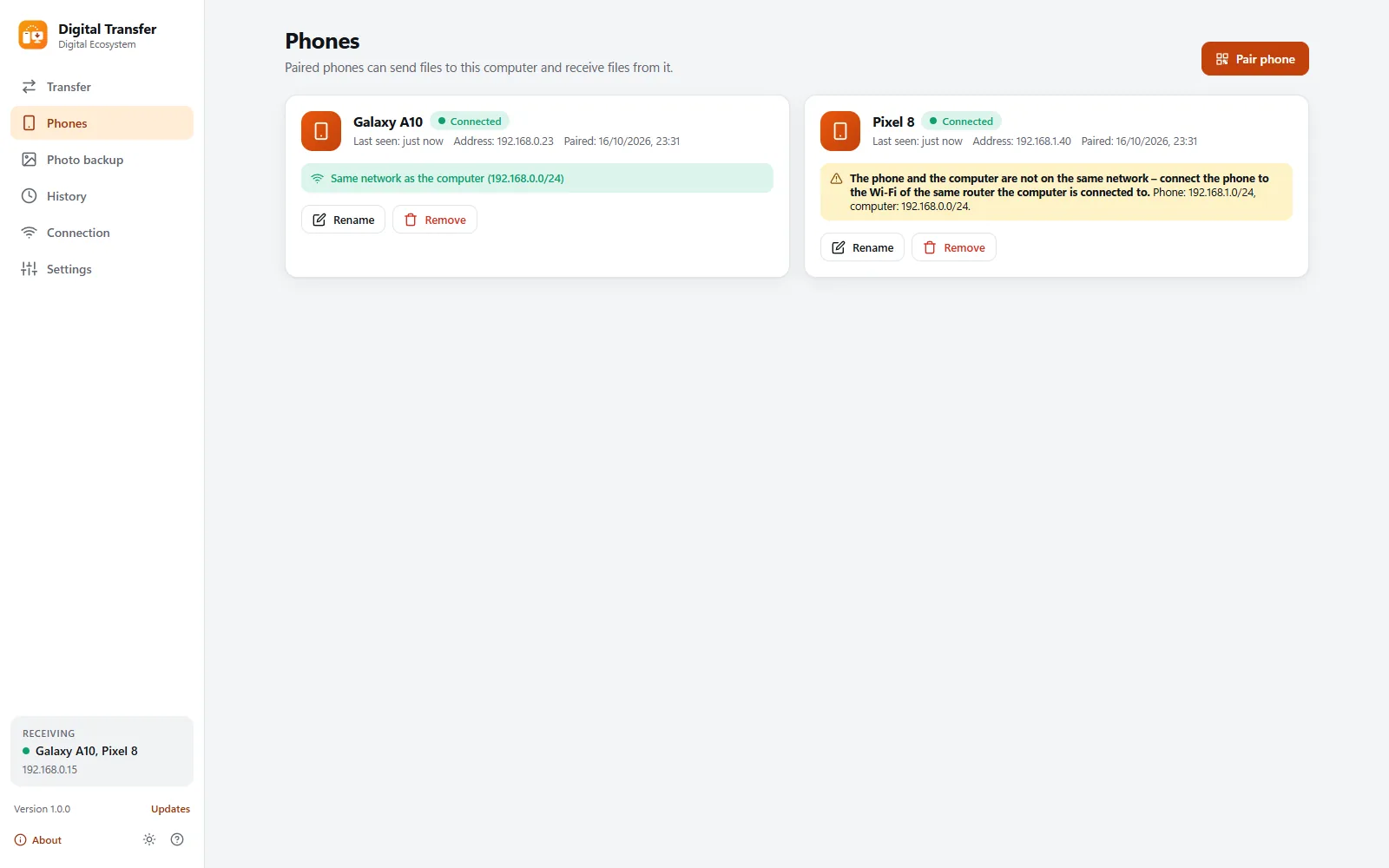
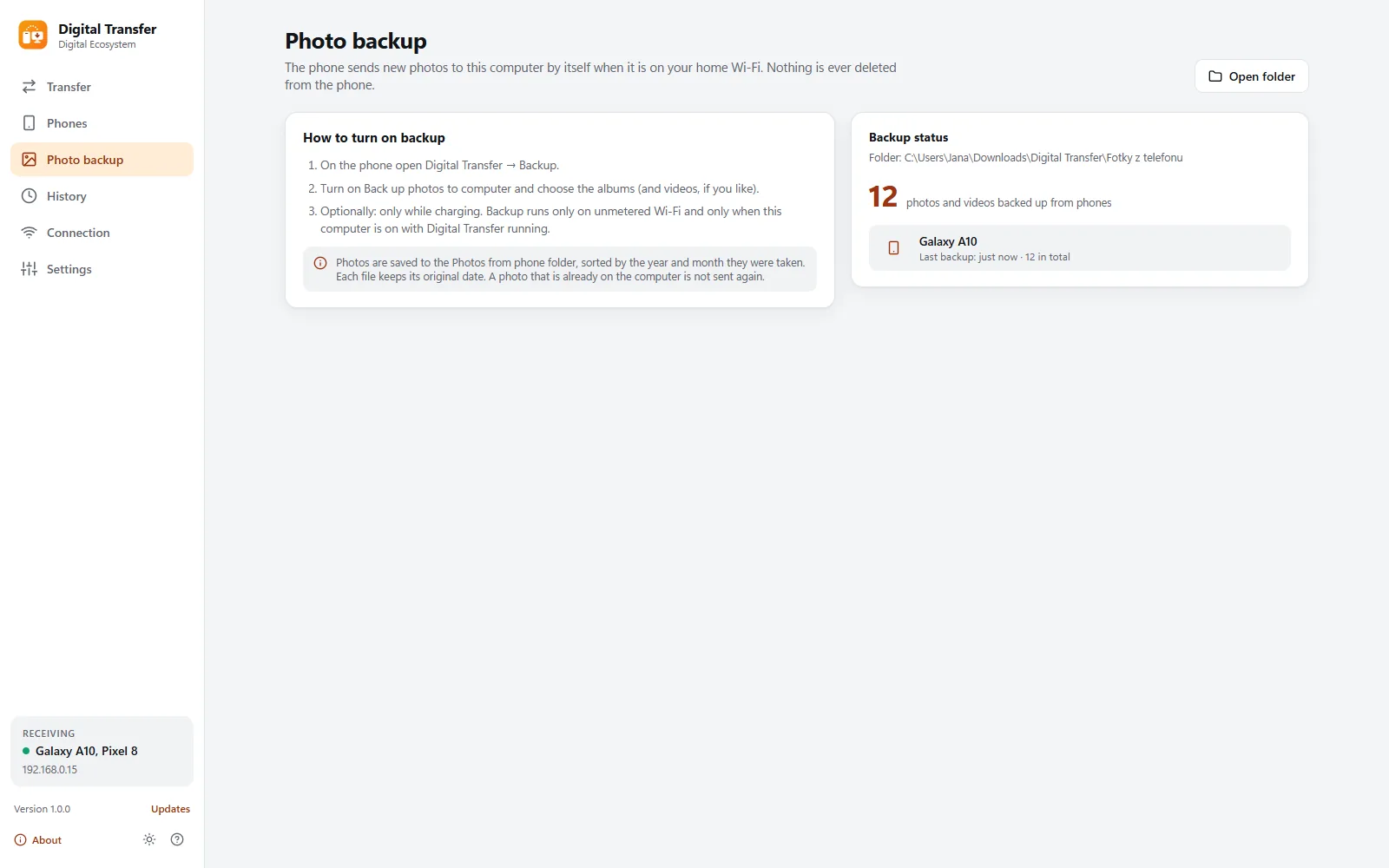
Sample data – nothing real.
Three steps
-
Install
Digital Transfer on your computer and on your phone. Installation needs no administrator rights. No account, no sign-in.
-
Pair your phone
On the computer open Phones and Pair phone, then scan the QR code with the phone. Without a camera, enter the computer address and an 8-digit code.
-
Send
On the computer drag files onto the window, on the phone use Share → Digital Transfer. Photos can back up by themselves.
Download Digital Transfer 1.0.0
The app is free. You need it on your computer and on your phone: choose your system.
Windows
Installer (.exe) · version 1.0.03105e40750bf6a663c9c486d28165ed301b166d7a56150014e1abe2febaab299Linux
Archive (.tar.gz) · version 1.0.0 Betac4f61d2e3e56cfd809bd3fa45fb22bf60dc9b3a13ab782a1522b32df0f87fcc8- Extract the archive:
tar xzf digital-transfer-1.0.0-linux-x64.tar.gz - Go into the folder and run
./install.sh. Digital Transfer is added to your applications menu. - To uninstall:
~/.local/share/digital-transfer/uninstall.sh
Android
APK · version 1.0.0 Betac7cbac583d49d1510f314dd2cc78d77a3dcad14fa9605f808e7408e0a6f7b694- Download the APK on your phone and open it.
- Android asks whether to allow your browser to install apps. Allow it (just for this install).
- The app then offers new versions itself and downloads them from here.
Windows may show a SmartScreen warning the first time you run it. The installer is not digitally signed yet. Click More info and then Run anyway. You can verify that the file is intact with the SHA-256 checksum above.
Windows asks about the firewall once, the first time you run it. Allow the app on your home network, otherwise the phone cannot reach it.
The Linux version is still in beta. We offer it as a tar.gz archive and are still testing it on different distributions. If you run into a bug, let us know – that is the fastest way to get it fixed.
Android is still in beta: this version is new and we are only now testing it on real phones – if something does not work, let us know. The app is not on Google Play, you install it from this website. You can check that the APK is intact with the SHA-256 checksum on the Android card; every version is signed with the same key, so only our updates can be installed over it.
What you need
- Windows
- Windows 10 or 11, 64-bit. Installs for the current user only, without administrator rights. You turn on Start at sign-in and the Send to → Phone entry in File Explorer in Settings.
- Linux
- 64-bit Linux with a graphical desktop. Keys are stored in the system keyring (libsecret or KWallet). The firewall (ufw, firewalld) must allow incoming connections from the phone; the app shows the port in the Connection section. You turn on Start at sign-in in Settings.
- Android
- Android 8.0 or newer. The QR code is scanned with the camera through Google Play services; otherwise use a photo of the QR code from the gallery, or the computer address and an 8-digit code (valid for 10 minutes).
- Network
- The phone and the computer must be on the same home Wi-Fi, that is, connected to the same router. Everything travels over the local network only, no internet is needed. Automatic photo backup runs only on Wi-Fi without data limits and only when the computer is reachable.
- Where files go
- The computer saves to a Digital Transfer folder inside Downloads (changeable), the phone to Download/Digital Transfer. Backed-up photos go to the Photos from phone folder, sorted by year and month.
- Internet
- The app connects to the internet only to check for a new version on our website and for a problem report that you send yourself. Your files never go over the internet.
Before you start
Is Digital Transfer really free?
Yes. No ads, no account and no subscription.
Do my files go through the internet or a cloud?
No. Files travel only over your local network, directly between your phone and your computer, and they are encrypted (AES-256-GCM, SPAKE2 pairing). There is no server of ours or anybody else in between, and you need no account. The app connects to the internet only to check for a new version on our website and for a problem report that you send yourself.
What if the phone and the computer do not connect?
The phone and the computer must be on the same network, that is, connected to the same router. The app detects this and tells you: on the computer in the Connection section, on the phone in Diagnostics. On Windows the firewall asks once the first time you run the app: allow it on your home network. On Linux the firewall must allow the incoming port shown in the Connection section. You can also find the computer on the phone manually by its address.
Does backup delete photos from my phone?
No. Backup only copies new photos (and optionally videos) to the computer, and nothing is ever deleted from the phone. It is off by default and you turn it on in the phone. It runs only on Wi-Fi without data limits and without duplicates: a photo that is already on the computer is not sent again.
Does it work with an iPhone?
Not yet. The mobile app is for Android 8.0 and newer only. The computer can run Windows or Linux.
Something not working or missing?
Write to us
Tell us your computer system version, your phone model and what happened. The only contact address is info@digital-ecosystem.cz.
Send an e-mailLast updated: 16 October 2026